Domain NamesFind and register your ideal domain name instantly.
 Web HostingEasy-to-use hosting powered by cPanel — ideal for managing websites in Nigeria.
 Windows HostingRun .NET apps with Windows-optimized hosting
 Affiliate ProgramMake money promoting our services
 Reseller HostingMake money by reselling our hosting products under your own brand
 .COM Domains
 All DomainsExplore all supported tld domains in Nigeria
 WhoisFind out who owns any domain, as well as verify your registration details
 VPS Hosting in Nigeria
 Dedicated ServersReimagine your site speed with your own complete server
 Website BuilderDesign your site with drag-and-drop tools
 Online Store BuilderStart your online shop without code
 SSLs
SSLs Support PortalFind answers or get expert help
 Contact UsReach our team via chat or email
 BlogRead our extensive guides on web hosting and more
Launching a website in Nigeria can feel stressful. One hosting company hides fees.
Another one loads so slowly that you start tapping your phone like it is frozen. It is easy to get tired before you even upload one file.
But here is the good news. You can host your website for free with web hosting github. You can do it in less than one hour.
And you do not need any special skill or even your debit card. That is the good thing with using GitHub Pages for web hosting on GitHub.
GitHub Pages takes your simple files and turns them into a live website that opens fast on phones and laptops.
No servers to manage. No long tutorials. Just upload your files, and your site goes live.
Many Nigerians use it for portfolios, blogs, side hustles, school projects, and small business pages.
If you want something quick, clean, and free, this guide is for you.
In this article, you will learn:
- What GitHub Pages is
- How to create your first repository
- How to upload your website
- How to connect your custom domain
- How to fix common problems
- When to upgrade to a full hosting plan
When you finish, your website will be online and ready to share with anyone.
What GitHub Pages Is
GitHub is a website where people store their projects and code. Think of it like a big online locker that never loses your files.

Inside that locker is a special feature called GitHub Pages. This feature turns your website files into a real site that anyone can visit.
You don’t need servers, you don’t need hosting knowledge, and you don’t need to pay.
GitHub Pages simply takes your HTML, CSS, and JavaScript files and makes them live on the internet.
Here is why people, especially Nigerians, love it:
1) It is free
As long as your project is public, you pay nothing. No hidden charges. No surprise bills at the end of the month.
2) It is fast
GitHub uses a global network, so your website loads quickly. Even when the Nigerian network is doing its usual drama, your site still behaves well.
3) It is secure
Every site gets automatic HTTPS. Visitors see that small lock icon, which means your site is safe to open.
4) It saves every change you make
If you make a mistake, you can go back to an older version. It is like having an undo button for your whole website.
5) It is beginner-friendly
If you can create one simple HTML file, you can host it on GitHub Pages.
Many Nigerians use GitHub Pages for:
- Portfolios
- Simple blogs
- Landing pages
- School or training projects
- Project documentation
When you outgrow static pages, maybe you want an online shop, a database, or email hosting.
Moving to a full hosting plan like Truehost becomes easy.
GitHub Pages is the perfect starting point. Free, fast, and simple.
Key Features Of GitHub Pages
GitHub Pages comes with a small set of tools, but those tools do big work.
If you are building a simple site and you want something that “just works,” these features make your life easier.
1) Free Hosting
You pay nothing to host a public site. This is a big relief, especially when you are trying to save money or test an idea before spending on a full hosting plan.
2) Custom Domain Support
You can use your own .com or .ng domain. So instead of yourname.github.io,
you can use
yourname.com
and look more professional.
3) Automatic HTTPS
GitHub gives every site a security lock. This protects visitors and makes your website look trustworthy. You do not need to set anything up, it works on its own.
4) Built-In Support for Jekyll
If you like writing blog posts in simple text, Jekyll can turn them into a clean blog automatically. You don’t need WordPress or a backend.
5) Fast Global Loading
GitHub uses a wide network of servers. Your site loads quickly no matter where your visitor is, Lagos, Abuja, Port Harcourt, or even outside Nigeria.
6) GitHub Actions (Optional Automation)
If you update your site often, GitHub Actions can publish changes automatically. You just push your files, and the system takes care of the rest.
Quick Comparison
Here’s a simple, short table you can scan fast:
| Feature | GitHub Pages | Shared Hosting |
| Cost | Free | Paid |
| Setup | Very fast | Slower |
| Best For | Static sites | Full apps |
GitHub Pages wins when you want something quick, clean, and free.
Shared hosting wins when you need databases, email, or advanced tools.
If you are building a portfolio, landing page, or basic blog, GitHub Pages gives you everything you need at zero cost.
When your project grows and needs more “power,” you can move to Truehost and unlock full control.
PREREQUISITES
Before creating your free website with GitHub Pages, there are a few basic things you need.
Nothing heavy. If you can browse the internet and copy and paste text, you’re good.
1) A GitHub Account
This is your number-one requirement.
GitHub Pages runs directly from your GitHub profile, so you’ll need an account.
It’s free.
It takes less than two minutes.
And you only need your email.
2) A Laptop or Desktop Computer
You can do tiny edits on a phone, but creating the site is much easier on a laptop.
Any simple computer is fine, even an old one. You’re just working with text files.
3) Basic Internet Connection
It doesn’t have to be fast.
Even a mobile hotspot or cafe Wi-Fi works.
The files are small, so uploading them won’t drain your data.
4) A Little Knowledge of HTML or Markdown (Optional but Helpful)
GitHub Pages can work with:
- HTML (the standard language for web pages), or
- Markdown (a very simple writing format)
You don’t need to be an expert.
If you can type text and add headings, you’re already halfway there.
5) A Simple Text Editor
You’ll write your website content in a basic editor like:
- Notepad / Notepad++
- VS Code
- Sublime Text
- Or even GitHub’s built-in editor
Everything is simple and beginner-friendly.
6) Your Content Ready
Know what you want to show:
- Your photos
- Your products
- Your services
- Your CV
- Your blog posts
- Anything you want people to see
Having your content ready makes the process faster and less confusing.
In short, the prerequisites are light and accessible.
If you’re reading this guide, you already have 80% of what’s required.
Step-by-Step Guide to Host a Static Website on GitHub
Now that you’re ready with your files and GitHub account, let’s get your website live. Follow these steps closely, and you’ll see your site online in no time.
1) Create a New GitHub Repository
Your repository is where all your website files live.
- Log in to GitHub.
- Click the “+” icon on the top-right and choose New repository.
- Give it a simple name, like my-nigeria-portfolio. If it’s your personal page, name it
yourusername.github.ioThat becomes your web address. - Set it to Public so GitHub Pages can host it for free.
- Tick: Add a README file to start.
- Click Create repository.
This is the backbone of your site. Keep it public until you consider paid plans for private hosting.
2) Add Your Website Files
There are two ways to get your files onto GitHub:
Option A: Upload via Web (Easy Mode)
- Go to your repo, click Add file > Upload files.
- Drag your index.html, CSS files, and images into the window.
- Add a commit message like “Initial site upload” and hit Commit.
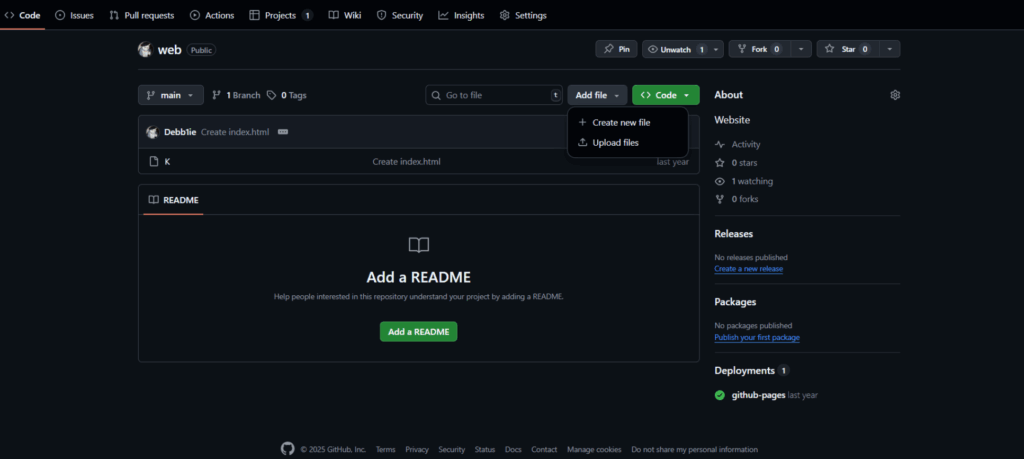
This is simple, like sending an email with attachments.
Option B: Using Git on Your Computer (Pro Mode)
- Open your terminal or Git Bash:
git clone https://github.com/yourusername/my-nigeria-portfolio.git
cd my-nigeria-portfolio
git add .
git commit -m “Initial upload of site files”
git push origin main
- Every update you make locally can be pushed, and Git keeps track of every change. This is great if you plan to update your site often.
3) Enable GitHub Pages
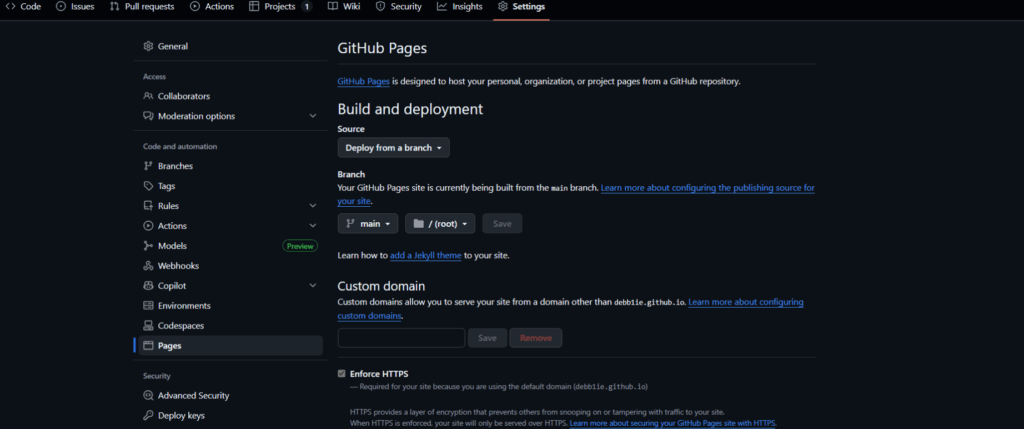
- Go to your repo’s Settings > Pages.
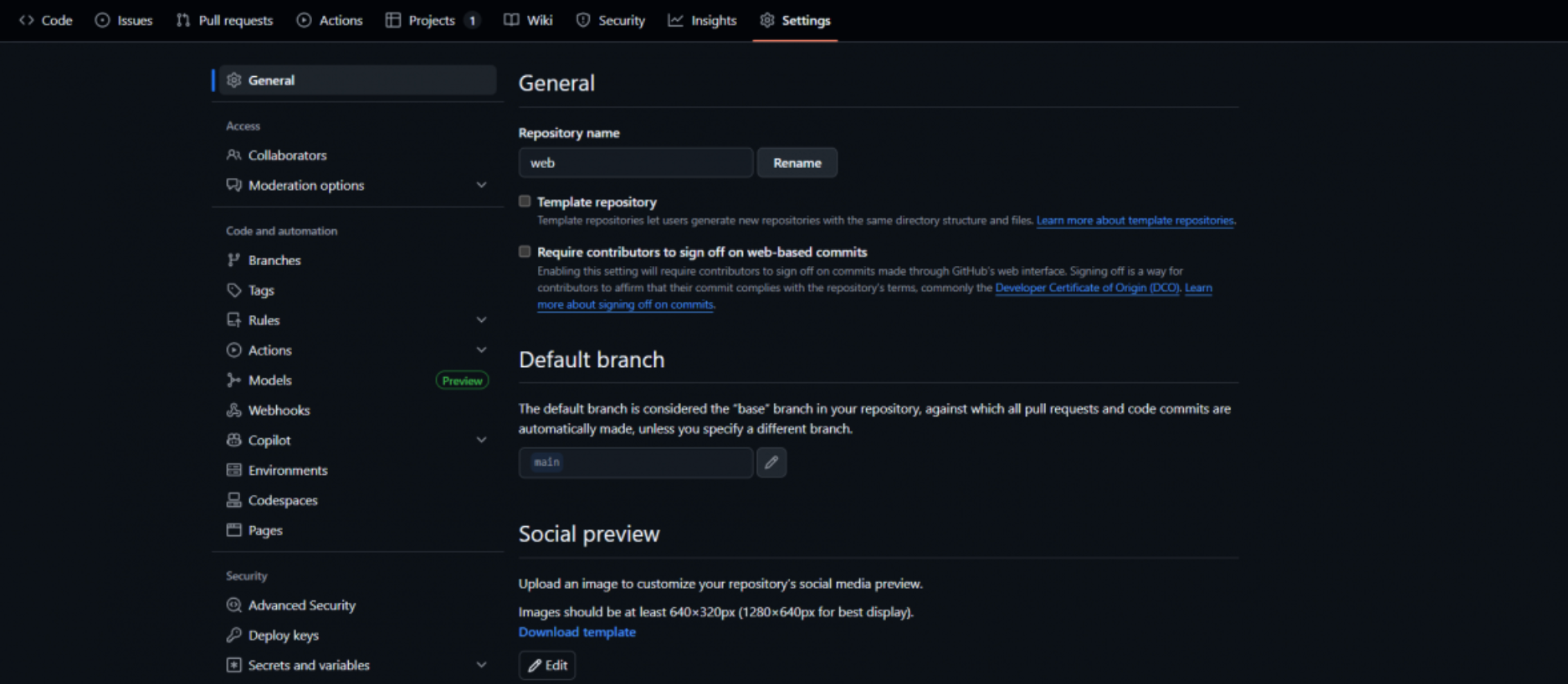
- Select Main branch and the root folder.
- Click Save.
Your website link will look like https://yourusername.github.io/my-nigeria-portfolio.
It may take 1–10 minutes to appear online. If it shows a 404 error, double-check your branch and folder selection or give it a little time.
4) (Optional) Connect a Custom Domain
If you bought a domain, like from Truehost:
- In Pages Settings, enter your custom domain (e.g.,
www.yourdomain.ng).
- Update DNS records at your registrar:
- A record: @ → GitHub IPs (185.199.108.153, etc.)
- CNAME: www →
yourusername.github.io
- A record: @ → GitHub IPs (185.199.108.153, etc.)
Changes may take 1–48 hours to propagate. HTTPS will automatically secure your site.
5) Test and Launch
- Open your site on desktop and mobile to check that everything looks right.
- Use tools like Google PageSpeed Insights to see load times.
- Add Google Analytics if you want visitor stats.
- Share the link on WhatsApp, LinkedIn, or Twitter. Your site is live!
GitHub handles the hosting heavy lifting you focus on content and updates.
Best Practices and Troubleshooting
Your site is live, but a smooth, professional website needs a few extra habits.
These tips keep things neat, fast, and glitch-free.
Best Practices
- Root index.html First
GitHub Pages looks for an index.html in your root folder. No root file? Your site won’t load. - Clean File Names
Use lowercase letters and no spaces. Example: my-portfolio.html instead of My Portfolio.HTML. This prevents broken links when sharing. - Commit Often
Every change deserves a commit message like “Updated hero section” or “Added Naija case study.” Git tracks changes and lets you undo mistakes easily. - Watch Jekyll
GitHub Pages sometimes skips _posts folders if Jekyll is active. If you don’t want Jekyll to interfere, add a .nojekyll file to your root. - SEO and Accessibility
- Add meta tags with keywords like “web hosting GitHub” so search engines find your site.
- Add alt text to images for screen readers and better indexing.
- Security First
Never put sensitive info like passwords in your code. GitHub’s HTTPS protects visitors, but your data is your responsibility.
Troubleshooting Common Issues
1) 404 Errors
- Make sure index.html is in the root folder.
- Check branch and source settings in Pages.
2) Build Failures
- Broken HTML or CSS can stop the site. Validate your code at validator.w3.org.
3) Custom Domain Problems
- DNS changes can take 1–48 hours. Track with whatsmydns.net.
4) Slow Loading in Nigeria
- Large images can lag. Compress them with tools like TinyPNG.
- GitHub’s global CDN helps, but smaller files load faster locally.
5) Connection Issues During Push
- Git caches offline changes. Reconnect and push again.
These habits keep your GitHub-hosted site running smoothly, fast, and professionally.
Advanced Topics and When to Scale
Once your site is live and running smoothly on GitHub Pages, you might wonder what’s next.
GitHub Pages is perfect for small projects, but when traffic grows or you need more features, it’s time to think about scaling.
Automate with GitHub Actions
If you update your site frequently, GitHub Actions is a lifesaver.
- Every time you push a change, Actions can automatically rebuild and deploy your site.
- No need to manually upload files each time. You focus on content, GitHub does the heavy lifting.
- Example: Add a new portfolio piece, push it, and it’s live within seconds no extra steps.
This is ideal for freelancers or side hustlers in Nigeria who want a professional workflow without spending hours on uploads.
Know the Limits of GitHub Pages
GitHub Pages is designed for static content:
- Portfolios and CVs
- Simple blogs
- Landing pages
- Documentation
It does not support:
- Databases
- E-commerce stores
- Complex web apps
When you need these features, it’s time to move to a full web host.
When to Move to Truehost hosting
Scaling doesn’t have to be painful. Truehost hosting is built for Nigerian creators:
- Local servers for faster access in Nigeria
- Database support for apps and e-commerce
- Email accounts for professional communication
- Paystack integration for easy local payments
Moving is simple: zip your repo, upload to Truehost, and you’re ready for bigger traffic and advanced features.
Benefits of Scaling
Switching from GitHub Pages to a full host gives you:
- Faster Local Speeds: Nigerian servers cut loading times.
- Payment Ease: Accept subscriptions or payments with Paystack.
- 24/7 Support: Quick fixes from local teams.
- Full Control: Run dynamic sites, manage databases, and expand without limits.
Conclusion
Congratulations! Your static website is now live on GitHub Pages fast, free, and secure.
From setting up your repository to uploading files and launching your site, you’ve done it all yourself. That’s a major win.
GitHub Pages is perfect for portfolios, landing pages, and small projects in Nigeria.
You can update content anytime, track changes, and share your work with clients or friends all without spending a coin.
When your project grows or needs more advanced features like databases, dynamic content, or local payment systems, scaling to Truehost hosting is effortless.
Nigerian servers, Paystack integration, and 24/7 support make growing smooth and worry-free.