Domain NamesFind and register your ideal domain name instantly.
 Web HostingEasy-to-use hosting powered by cPanel — ideal for managing websites in Nigeria.
 Windows HostingRun .NET apps with Windows-optimized hosting
 Affiliate ProgramMake money promoting our services
 Reseller HostingMake money by reselling our hosting products under your own brand
 .COM Domains
 All DomainsExplore all supported tld domains in Nigeria
 WhoisFind out who owns any domain, as well as verify your registration details
 VPS Hosting in Nigeria
 Dedicated ServersReimagine your site speed with your own complete server
 Website BuilderDesign your site with drag-and-drop tools
 Online Store BuilderStart your online shop without code
 SSLs
SSLs Support PortalFind answers or get expert help
 Contact UsReach our team via chat or email
 BlogRead our extensive guides on web hosting and more
Have you ever sent an important business proposal from a @gmail.com address and quietly wondered if it looked… too casual? The message was good, but the email itself didn’t command the respect it should have. You’re definitely not alone.
In 2026, your email address is more than a way to send messages. It’s your digital identity. It’s often the first thing a client, investor, or partner sees before they even open your website. And when that identity lives on a free platform you don’t control, it can hold you back in ways you don’t always notice.
Here’s the truth most people don’t tell you: owning your email platform is no longer a “big company thing.” It’s not reserved for tech giants or enterprises with massive IT teams. It’s for you.
If you’re running a growing business in Lagos, leading a startup team, or building the next big app, having your own email server puts you in full control. You decide where your data lives. You improve the reliability of how your emails reach inboxes. And you shape how professional your brand appears online.
And that control matters. A lot.
In this guide, we’ll walk through the entire email server setup process, step by step, from the basics to a fully working system.
We at Truehost have helped thousands of businesses and developers move away from restrictive third-party email providers. Many of them were tired of inbox limits, spam issues, and sudden account restrictions. Others simply wanted something better, more private, professional, and more reliable.
By the end of this guide, you’ll understand exactly how to build an email system that works for you, not against you.
Why You Should Set Up Your Own Email Server
Before you get into commands, configurations, and DNS records, it helps to understand why this decision matters.
Setting up your own email server isn’t just a technical upgrade. It’s a business move that gives you long-term control, stability, and credibility.
a) Full Ownership of Your Data
When you use free or third-party email services, your messages live on someone else’s servers. That means your data is subject to their rules, scans, limits, and sudden policy changes.
With your own email server, you own everything. Your emails, attachments, and logs stay on infrastructure you control. No silent monitoring nor unexpected account suspensions.
Your communication stays private, predictable, and fully yours.
b) A More Professional Brand Image
First impressions matter. Sending emails from [email protected] instantly signals that your business is serious and established. Clients trust branded email addresses more than generic ones, especially when discussing payments, contracts, or partnerships.
A custom email domain makes your brand look legitimate, organized, and ready for growth. It tells people you’ve invested in your business, not just signed up for a free tool.
c) Real Flexibility as You Grow
With your own email server, you’re not limited by fixed plans or per-user pricing. You can create email accounts for staff, departments, or projects whenever you need them. Add support@, sales@, or admin@ in minutes. Remove unused accounts just as easily.
As your team grows, your email system grows with you, without forcing you to upgrade to expensive plans.
d) Lower Costs for High-Volume Email
If you send a lot of emails, newsletters, transactional messages, notifications, or customer updates, third-party platforms can get expensive fast. Monthly fees, sending limits, and add-on charges quickly add up.
Running your own email server reduces these costs significantly. Once your server is set up, you’re not paying per email or per user. Over time, this becomes a far more affordable solution, especially for businesses that rely heavily on email communication.
Is Self-Hosting Right for You in 2026?
Ask yourself these questions:
- Do you have time to maintain the server?
- Can you fix issues fast if emails stop working?
- Do you need high reliability (99.9% uptime)?
If you answer “yes” to all, go ahead. Otherwise, consider hosted options like our email hosting plans. They handle the hard parts for you.
Many guides from 2025–2026 say self-hosting suits tech-savvy users or small teams. For most, managed services win on ease and deliverability.
What You Need Before Starting
Gather these first:
- A domain name (e.g., yourdomain.com). Buy one if you don’t have it.
- A VPS or dedicated server with a static IP. Truehost offers great VPS hosting in Nigeria, fast and affordable.
- Ubuntu 24.04 LTS (latest stable in 2026) is installed on your server.
- Basic SSH access (use Putty or terminal).
- Root or sudo privileges.
Minimum specs: 2 vCPU, 4GB RAM, 50GB SSD storage. More if you expect lots of emails.
How to Set Up an Email Server
Don’t worry if the email server setup feels overwhelming at first. These steps break the process down into simple actions you can follow with confidence.
1) Choosing the Right Hosting Environment
Your email server depends heavily on where it runs. If the hosting environment is weak, you’ll face slow delivery, downtime, or emails landing in spam. This step sets the foundation for everything else.
a) Use a VPS or Dedicated Server
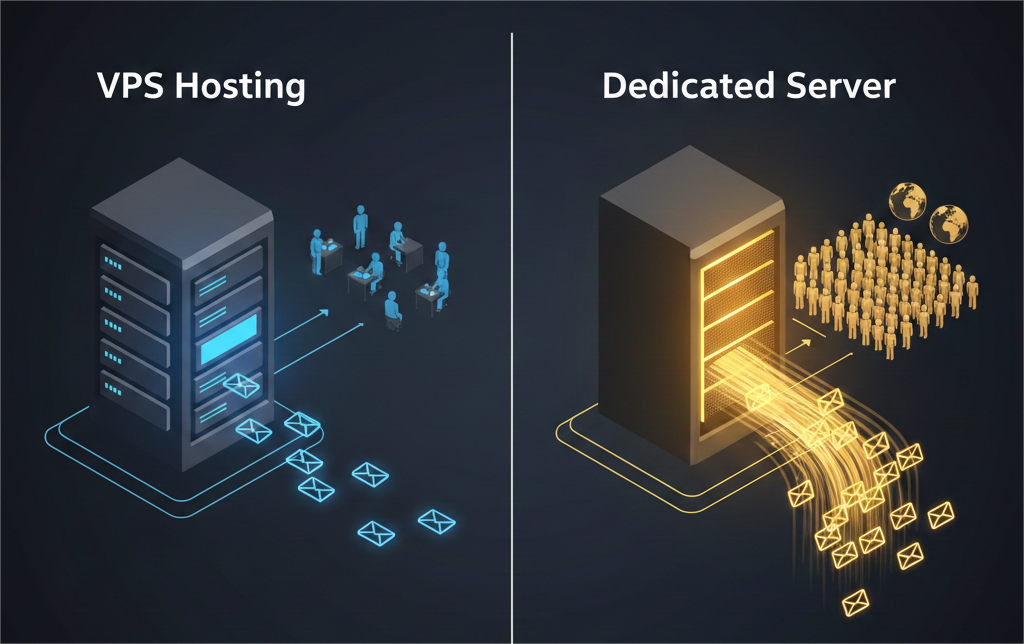
Email servers need consistent resources to work properly. Shared hosting often restricts sending limits and background processes, which can cause delays or failed deliveries.
A VPS works well for small to medium teams.
A dedicated server is better if you send large volumes of email or run multiple domains.
b) Allocate Enough Resources
Email systems handle messages constantly. Without enough RAM or CPU power, queues build up, and emails get delayed.
- Small teams: at least 2GB RAM and a dual-core CPU
- Growing businesses: 4GB RAM or more for smoother performance
c) Prioritize Uptime and Stability
Email servers must be available at all times. When your server goes offline, emails stop flowing.
High uptime leads to:
- Better inbox delivery
- Fewer bounced messages
- More trust from other mail servers
2) Picking Your Email Server Software
Not all email server software is the same. Choosing the right one makes setup easier and long-term maintenance less stressful.
i) Postfix
Postfix is open-source, reliable, and widely used across Linux servers. It’s simple to manage and well-documented, which makes it perfect if this is your first email server.
ii) Exim
Exim offers deep customization and flexibility, but it requires more technical knowledge. It’s best suited for advanced users who need fine-grained control.
iii) Microsoft Exchange
Exchange is a premium, Windows-based solution that works smoothly with Outlook and other Microsoft tools. It’s powerful, but comes with higher costs and system requirements.
iv) Zimbra
Zimbra combines email with calendars and contacts in one platform. It’s useful for collaboration, but uses more server resources.
For most users, Postfix is the best starting point due to its balance of simplicity and reliability.
3) Installing Your Email Server
Once your server and software are chosen, installation comes next. This step prepares your system to send and receive emails.
You’ll install the email software on your server and link it to your domain. During setup, you’ll be asked for your domain name and how the server should handle outgoing mail. Choosing the standard “internet” option allows your server to communicate directly with other mail servers worldwide.
After installation, your email service should be running in the background, ready for configuration.
4) Configuring Your Email Server
Configuration is what makes your email server trustworthy. Without it, even properly sent emails may never reach inboxes.
a) Set Up DNS Records
DNS records tell other mail servers that your server is legitimate.
- MX records direct incoming email to your server
- SPF records confirm your server is allowed to send emails for your domain
- DKIM records digitally sign your emails to prove authenticity
- DMARC records protect your domain from being abused or spoofed
These records are added through your domain’s DNS manager. Truehost makes this process simple through its domain management dashboard.
b) Apply Core Mail Settings
You’ll also define how your server identifies itself, which domain it sends mail from, and how it handles incoming messages. These settings ensure emails are routed correctly and accepted by receiving servers.
Once saved, the email service is restarted so the changes take effect.
5) Setting Up Email Accounts
With the server configured, you can now create actual email addresses.
Each email account represents a user, such as:
On Linux systems, creating a user automatically creates an email address. If you prefer a visual interface, you can use a control panel to add accounts, set passwords, and define mailbox limits without touching the command line.
This flexibility makes it easy to add or remove accounts as your team grows.
6) Securing Your Email Server
Security protects your server from abuse and keeps your emails out of spam filters.
a) Encrypt Email Traffic
SSL and TLS encryption keep emails private while they’re being sent and received.
b) Use Strong Passwords
Weak passwords are one of the fastest ways for attackers to gain access. Always use long, complex passwords for email accounts.
c) Block Unauthorized Access
Security tools can automatically block repeated login attempts, stopping brute-force attacks before they cause damage.
d) Keep Software Updated
Regular updates fix vulnerabilities and improve server stability.
A secure email server isn’t optional. It’s the foundation of trust and reliable communication.
7) Testing Your Email Server
Before using your server in real situations, testing is essential.
Start by sending emails to popular providers like Gmail or Outlook. Confirm that messages arrive in the inbox, not the spam folder. Then, verify your DNS records to ensure everything is correctly set up.
Testing helps catch small issues early, before they affect customers or business communication.
Optimizing Email Delivery
Setting up an email server is one thing. Making sure your emails actually land in the inbox is another. Good delivery rates protect your messages from spam filters and keep your domain trusted over time.
i) Keep Your Server Off Blacklists
Mail servers that send spam get blacklisted fast. If your server IP ends up on a blacklist, even legitimate emails can be rejected. Make it a habit to check your server’s IP reputation regularly and fix issues early before they affect delivery.
ii) Stick to Consistent Sender Addresses
Using too many different “from” addresses can confuse spam filters. It looks suspicious when emails suddenly come from multiple identities. Stick to a small set of consistent sender addresses that clearly match your domain and purpose.
iii) Control How Many Emails You Send
Sending a large number of emails at once can trigger spam protection systems, even if the content is valid.
Spread outgoing emails over time and set hourly limits. This steady pattern helps other servers trust your email traffic.
iv) Watch Your Bounce Rates
High bounce rates signal poor email hygiene. Invalid or inactive email addresses damage your sender’s reputation.
Regularly remove bounced emails from your lists to keep your domain clean and trusted.
Conclusion
Setting up your own email server puts the power back in your hands. You gain full control over your data, present a more professional brand, and build a secure communication system you can trust.
While the process may seem technical at first, breaking it down step by step makes it far more approachable than it looks.
At Truehost, we’ve simplified this journey with reliable infrastructure, email-ready servers, and clear, practical guides designed for real users, not just system admins. You don’t have to figure everything out alone.
What to Do Next
- Choose a VPS or Dedicated Server that fits your email needs
- Use the steps in this guide to install, configure, and secure your mail server
- Start sending professional, domain-based emails with confidence
If you’re ready to take full control of your email and look more professional online, Truehost VPS gives you the right foundation to get started, fast, stable, and built for deliverability.