Domain NamesFind and register your ideal domain name instantly.
 Web HostingEasy-to-use hosting powered by cPanel — ideal for managing websites in Nigeria.
 Windows HostingRun .NET apps with Windows-optimized hosting
 Affiliate ProgramMake money promoting our services
 Reseller HostingMake money by reselling our hosting products under your own brand
 .COM Domains
 All DomainsExplore all supported tld domains in Nigeria
 WhoisFind out who owns any domain, as well as verify your registration details
 VPS Hosting in Nigeria
 Dedicated ServersReimagine your site speed with your own complete server
 Website BuilderDesign your site with drag-and-drop tools
 Online Store BuilderStart your online shop without code
 SSLs
SSLs Support PortalFind answers or get expert help
 Contact UsReach our team via chat or email
 BlogRead our extensive guides on web hosting and more
Things finally start moving.
Your campaigns begin to pay off, people are clicking your links, and traffic keeps rising.
Then the cracks show.
Pages take forever to load. Forms hang. Some visitors give up before the site even opens.
What should feel like progress turns into stress, for you and for everyone trying to access your website.
Slow pages don’t just annoy users. They chip away at confidence. Each delay makes people doubt your brand. Each error sends potential customers elsewhere. A moment that should have pushed your business forward ends up slipping away.
This is more common than many businesses like to admit. It’s rarely about bad marketing or a weak product. Most times, the website simply wasn’t built with growth in mind.
This is where website scaling comes in.
Website scaling is about making sure your site can handle more users, more traffic, and more activity without slowing down or falling apart. It’s how you build a website that keeps performing, even as demand increases.
If you run a blog, an online store, a SaaS product, or a growing business website in Nigeria, this guide is for you.
In this 2026-ready checklist, you’ll learn how to scale your website step by step. In addition, you’ll get real tools that help your site stay fast, stable, and ready for the growth you’re working toward.
What Exactly is Website Scaling?
Scaling is the process of upgrading your website’s capacity to handle more traffic and data. It is not just about “getting a bigger server.”
It’s about making sure every part of your site, from the database to the images, works together under pressure.
It means:
- Your site stays fast during traffic spikes
- Pages load smoothly for users across locations
- Your server doesn’t go down when demand increases
There are two main ways websites scale.
a) Vertical scaling
This means adding more power to a single server. This could be more RAM, more CPU, or more storage.
It works well for growing websites that need better performance without changing their setup too much.
b) Horizontal scaling
It involves adding more servers and spreading traffic across them. Instead of relying on one machine, the workload is shared.
This approach is best for high-traffic platforms that need to stay fast and stable even when thousands of users are online at the same time.
Why Website Scaling Matters More in 2026
User expectations are higher than ever.
People won’t wait for slow pages, search engines won’t rank unstable sites, and customers won’t forgive downtime.
Here’s what poor scaling costs you:
- Lost sales
- Lower SEO rankings
- Bad user experience
- Security risks
On the flip side, proper website scaling helps you:
- Handle viral traffic
- Rank better on Google
- Build trust with users
- Save money long-term
Signs Your Website Needs Scaling
If you’re seeing any of these, it’s time to scale.
- Pages take longer to load
- Site crashes during promotions
- Hosting CPU or RAM limits get hit often
- Users complain about errors
- Traffic has outgrown shared hosting
Website Scaling Checklist for 2026
Let’s break this down into clear, actionable steps.
1) Start With the Right Hosting Foundation
Your website can only grow as far as your hosting allows.
If your traffic is increasing and you’re still on shared hosting, you’re already hitting a ceiling.
Shared hosting means your site competes for resources with hundreds of others on the same server. When traffic rises, performance drops. During peak hours, things slow down. Usage limits kick in quickly.
For real website scaling, shared hosting isn’t enough.
This is where VPS or cloud hosting comes in. These options give your website its own resources, so performance stays consistent even as demand grows.
At Truehost, many growing Nigerian businesses choose VPS hosting because it offers:
- Dedicated CPU and RAM
- More reliable performance
- Faster and simpler upgrades
For most websites, this is the first and most important step in scaling properly.
2) Optimize Your Website Speed First
Scaling won’t fix a slow website.
Before adding more server power, your site needs to be efficient. Otherwise, you’ll just be paying more to run the same problems.
Focus on the basics:
- Compress large images
- Remove plugins you no longer use
- Clean up messy or unused code
- Use lightweight themes built for performance
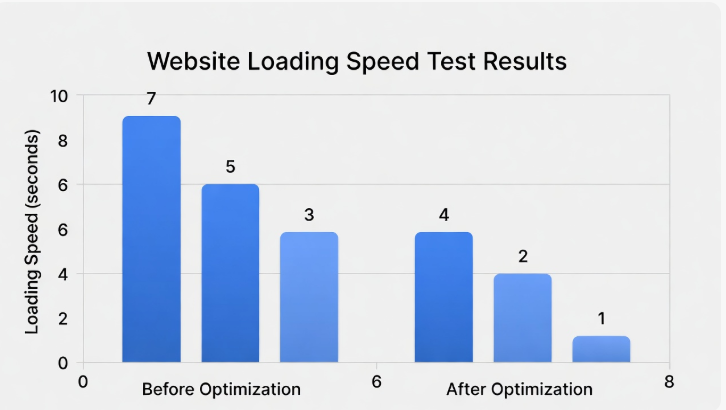
Speed directly affects results.
Even a one-second delay can reduce conversions by about 7%. That adds up fast. A fast website scales better, costs less to run, and keeps users engaged.
3) Use a Content Delivery Network (CDN)
A CDN helps your website load faster by storing copies of your content across different locations.
When someone visits your site, content is delivered from the server closest to them. This reduces load time and takes pressure off your main server.
A CDN is especially useful if:
- Your visitors come from different countries
- Your site has images, videos, or large files
- Traffic keeps increasing month after month
In 2026, CDNs are a core part of smart website scaling.

4) Scale Your Server Resources Gradually
Scaling doesn’t mean jumping to the biggest server immediately.
The smarter approach is to grow based on real usage. Monitor how your site performs and upgrade only when needed.
Pay attention to:
- CPU usage
- RAM consumption
- Disk performance
- Traffic trends
When these stay consistently high, it’s time to scale.
With VPS hosting, this usually means increasing RAM, adding CPU cores, or expanding storage. You get better performance without sudden spikes in cost.
5) Optimize Your Database
Databases often slow websites down quietly.
As your site grows, your database fills up with old data, unused records, and inefficient queries. Over time, this causes delays and errors.
To keep things running smoothly:
- Remove unused or outdated data
- Optimize database tables regularly
- Use proper indexing
- Reduce heavy or repeated queries
For WordPress sites especially, database optimization alone can lead to noticeable speed improvements.
6) Prepare for Traffic Spikes
Traffic doesn’t always grow slowly.
Sales campaigns, influencer mentions, and seasonal promotions can bring sudden spikes. If your site isn’t ready, it struggles.
A scalable website plans for these moments.
That means:
- Using caching as much as possible
- Enabling server-level caching
- Watching traffic in real time
- Having extra resources available when needed
At Truehost, managed hosting users often handle spikes smoothly because their servers are already tuned for growth.
7) Improve Security as You Scale
Growth brings attention, and not all of it is good.
As traffic increases, so do attacks, bots, and vulnerability scans. A security issue on a growing website causes more damage than on a small one.
Scaling securely includes:
- Installing SSL certificates
- Keeping plugins, themes, and software updated
- Using firewalls and protection tools
- Running regular backups
Security and scaling go together. A fast site means nothing if users don’t trust it.
8) Automate Backups and Recovery
The more your website grows, the more there is to lose.
More content, more users, more transactions, all of it increases risk. Manual backups aren’t reliable enough at this stage.
A scalable setup should include:
- Daily automated backups
- Backups stored off the main server
- One-click restore options
This gives you peace of mind and saves hours of recovery time if something goes wrong.
9) Monitor Everything
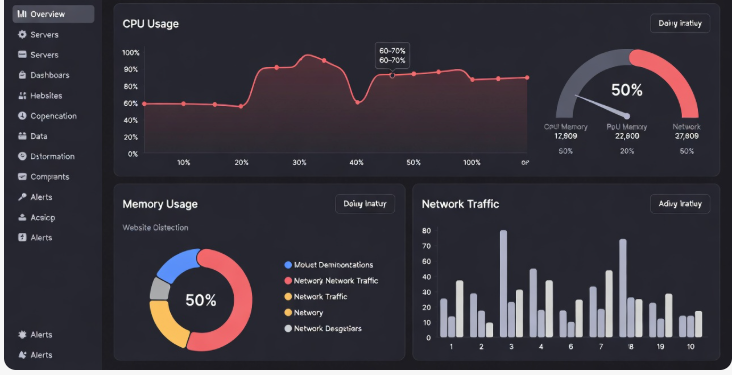
You can’t scale what you don’t track.
Monitoring tools help you understand how your website behaves under pressure and where upgrades are needed.
Track things like:
- Uptime
- Page load speed
- Server resource usage
- Error rates
With proper monitoring, you spot problems early and scale before users are affected. The best scaling decisions are always based on real data.
10) Plan for Future Growth
Website scaling isn’t a one-time task. It’s ongoing.
Ask yourself:
- Where will traffic be in six months?
- Will you add new features or products?
- Are you expanding into new regions?
Choose hosting and tools that:
- Make upgrades easy
- Support VPS or cloud growth
- Don’t lock you into rigid limits
Planning reduces costs, avoids downtime, and makes growth far less stressful.
Common Website Scaling Mistakes to Avoid
Website scaling seems simple on the surface, but many site owners still get it wrong, even with experience.
1) Scaling too late
Waiting until your website slows down or crashes is risky. By the time problems show up, visitors have already been affected, and opportunities may be lost. Scaling works best when it’s done before performance drops.
2) Overpaying for unused resources
Bigger isn’t always better. Paying for extra CPU, RAM, or storage you don’t use wastes money. Smart scaling is based on real usage, not guesswork.
3) Ignoring performance optimization
Adding more server power without fixing slow pages, heavy images, or bloated plugins only hides the problem. Optimization should come first, then scaling.
4) Relying on shared hosting for growth
Shared hosting is fine at the beginning, but it quickly becomes a bottleneck. As traffic grows, shared resources lead to slow speeds and instability.
5) Forgetting backups
Growth increases risk. Without regular automated backups, a single issue can erase weeks or months of progress. Backups are not optional when scaling.
Avoiding these mistakes helps your website grow smoothly, stay reliable, and perform well as demand increases.
Conclusion
Website scaling works best when it’s planned, not rushed.
When your website is built on the right hosting, runs fast, stays secure, and is backed up properly, growth feels exciting instead of overwhelming. You’re able to welcome more visitors, handle more sales, and support more users without worrying about slow pages or sudden downtime.
The key is to scale step by step. Optimize performance early. Upgrade resources based on real usage. Keep monitoring your site so you’re always one step ahead of problems.
Growth should never be the reason your website breaks.
If your website is starting to outgrow its current setup, Truehost is here to help. Our VPS and managed hosting solutions are designed to grow with you, stable, secure, and easy to scale when you need it most.